
How StepGate works
You pick the apps. You set a step goal. Until you've walked it, those apps stay locked. Here's every moving part.

The rule
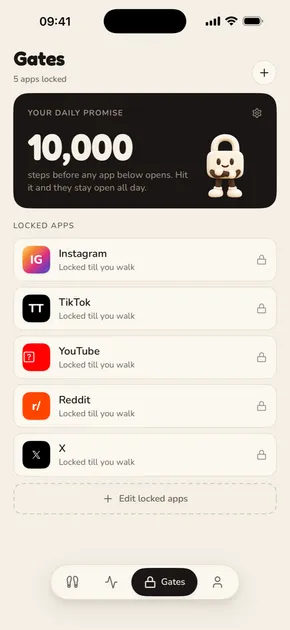
Steps before scrolling. Every day, the apps you choose stay locked until you reach your step goal. Hit it, and every one of them opens for the rest of the day.
StepGate does the locking with Apple's Screen Time framework (Family Controls), so a locked app really is locked: tapping it shows a shield, not the app. There's no timer to manage once you're unlocked and no points to spend.
You choose the apps in Apple's own picker. Apple hands StepGate private tokens rather than app names, so StepGate can't see what you picked.

What you see when an app is locked
Opening a locked app shows StepGate's lock screen: "TikTok is locked. You promised steps first. A 25-minute walk and it's yours for the rest of today."
Steps left are said as walking time, worked out at about 100 steps a minute. Up to ten minutes you get the exact minutes. Longer walks round to the nearest five minutes, and big gaps are split into a few walks ("two 25-minute walks").
There's one button, Go walk. It closes the app and sends you a notification with your progress.
A day with StepGate
- 6:00 AM
Your lock is on
At the start of your lock hours, the apps you picked lock. A morning notification says so. This happens even if StepGate is closed.
- Any time
You open a locked app
Instead of the feed you get the StepGate lock screen: how far you have to go, as a walk, and a Go walk button.
- Through the day
You walk
Your iPhone and Apple Watch count steps into Apple Health. StepGate reads them and counts down.
- 7:00 PM
A nudge, if you need one
If you haven't hit your goal, an evening reminder tells you what's left. No nudges on rest days.
- Goal hit
Everything opens
Every locked app opens for the rest of the day. "Goal hit. Phone's yours."
- Midnight
Steps start again
Your count resets at midnight. The lock comes back at the start of tomorrow's lock hours.
Times shown are the defaults. You set your own lock hours.
Where your steps come from
StepGate reads steps from Apple Health and your iPhone's motion sensor, and uses whichever is higher at the moment, so a walk in progress counts before Health catches up. Steps from an Apple Watch count too, through Apple Health.
Access is read-only. StepGate never writes to Health. It also reads distance, active energy and exercise time to fill in your Today tiles, and lists walks and runs other apps saved to Health.
When StepGate is open it updates as you walk. When it's closed, iOS decides when it can check in the background, so unlocking can lag. Opening StepGate always catches up straight away.
Everything you can set
| Setting | What it does |
|---|---|
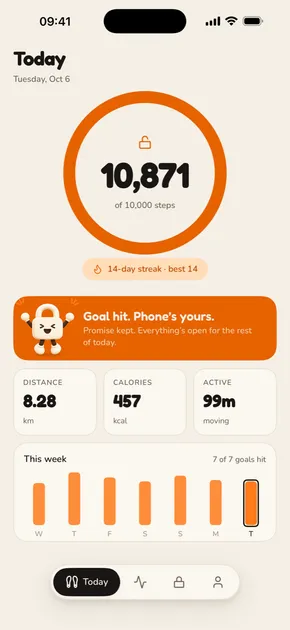
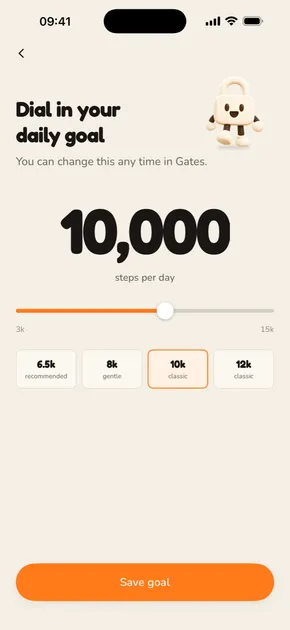
| Daily goal | 3,000 to 15,000 steps, in steps of 500. Suggested during setup from your last week in Apple Health. Change it any time. |
| Locked apps | Any apps, whole categories or websites, picked in Apple's Screen Time picker. No limit set by StepGate. |
| Rest days | Any days of the week. Sunday by default. The lock is off all day. |
| Lock hours | When the lock runs. 6:00 AM to 9:00 PM by default. Outside them your apps are open. |
| Pause | 5, 10, 15 or 30 minutes. The lock comes back on its own. |
| Reminders | A morning "your lock is on" and an evening "still time today". Each can be turned off. |
| Units | Kilometres or miles. |
Setup takes a few minutes
- Tell StepGate a little about your day and your phone habit.
- Allow Motion & Fitness and Apple Health, so it can count steps.
- Set your goal. StepGate suggests one from your last week.
- Pick your apps in Apple's Screen Time picker.
- Try the lock. StepGate really locks your apps for up to three minutes so you can open one and see it work.
- Hold to promise. Press and hold to commit to steps before scrolling.
No account, no email. StepGate needs a StepGate Plus subscription.
Streaks, trends and widgets
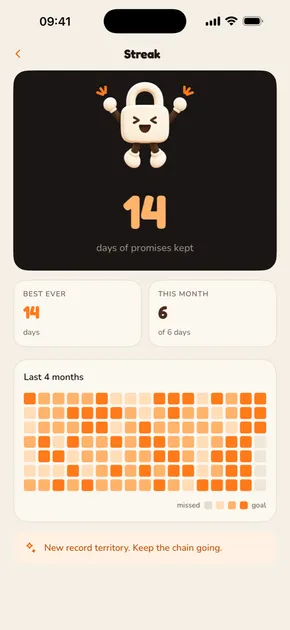
Your streak counts the days in a row you hit your goal. You'll also see your best streak, a heatmap of the last four months, and week, month and year trends with your goal line.
Add a small Home Screen widget with your step ring, or one of two Lock Screen widgets: a step ring, or steps to unlock.
Honest about the exits
You can always get out of the lock: pause it, take a rest day, change your lock hours, lower your goal or remove an app. That's deliberate: a lock with no way out tends to get deleted. StepGate makes the walk the default and keeps the exits a few taps away.
If your subscription ends, StepGate lifts the lock. It never keeps your apps hostage.